Skip to content
GST billing built for Indian businesses

GST billing, stock and accounts in one place

Create invoices, record payments, and keep track of what you have in stock. Botmaster ERP brings everyday billing and accounting together for Indian small businesses.

  • 64-bit Windows 10 or later
  • Core billing works offline
  • Your company file stays on your PC
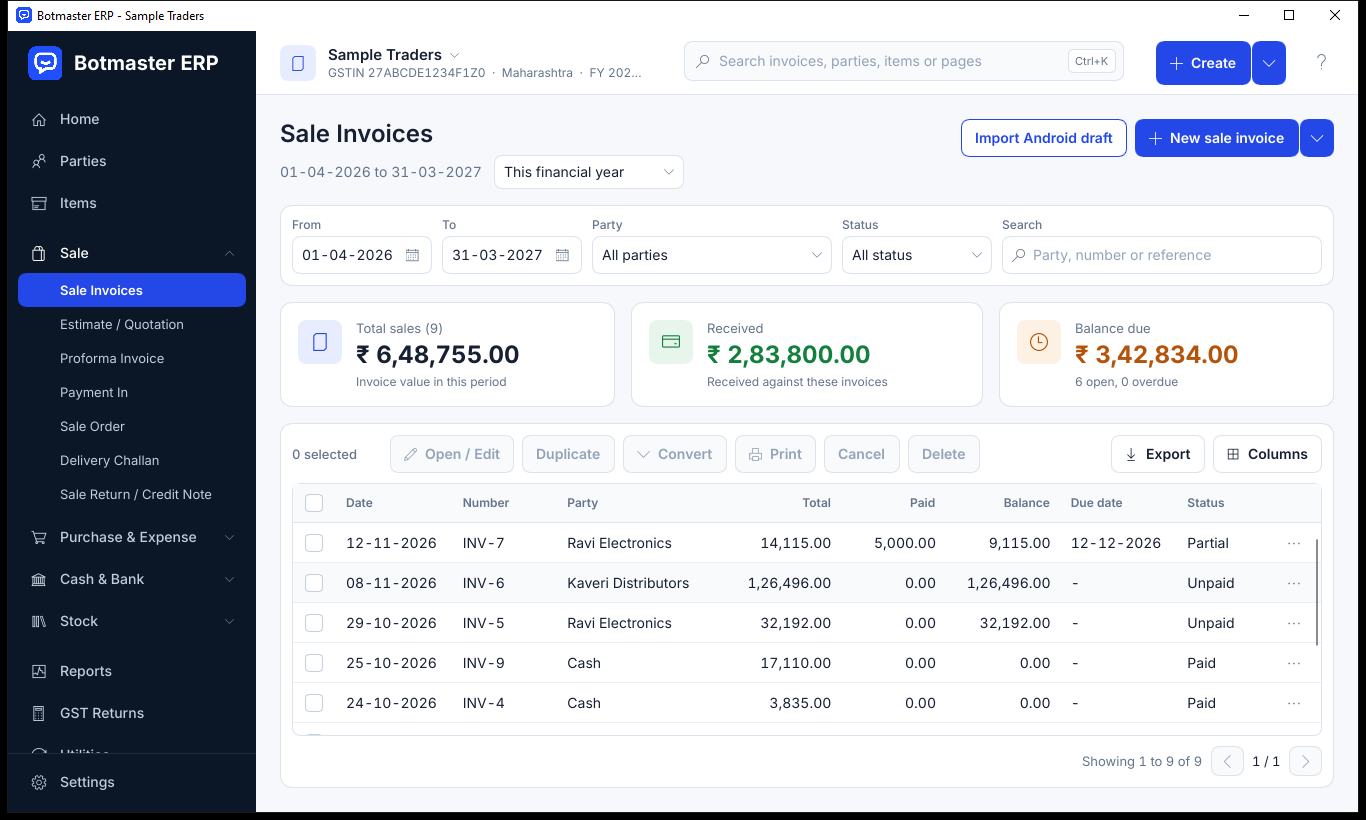
Sale invoice register with totals received and balance due in rupees.
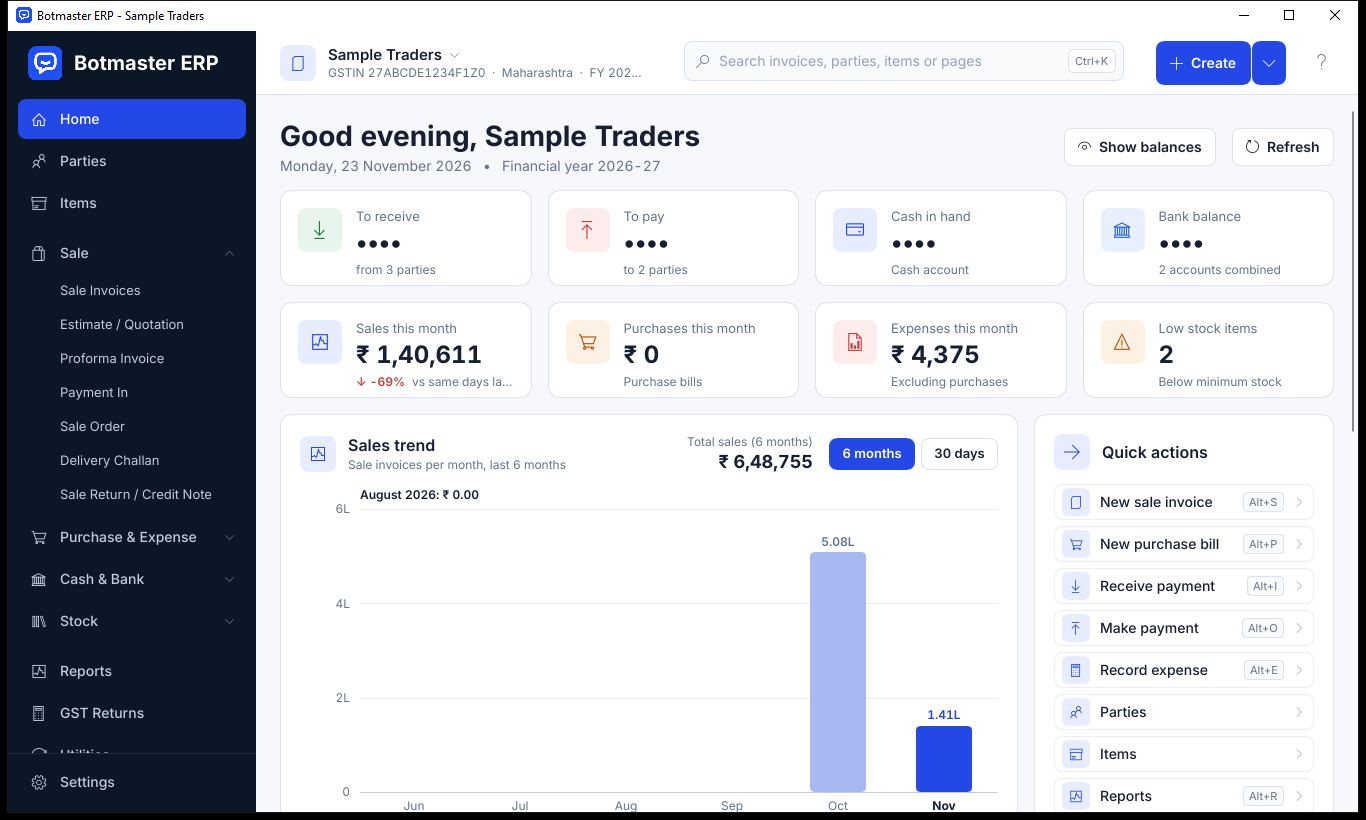
Botmaster ERP Windows dashboard showing sales this month, sales trend and quick actions.
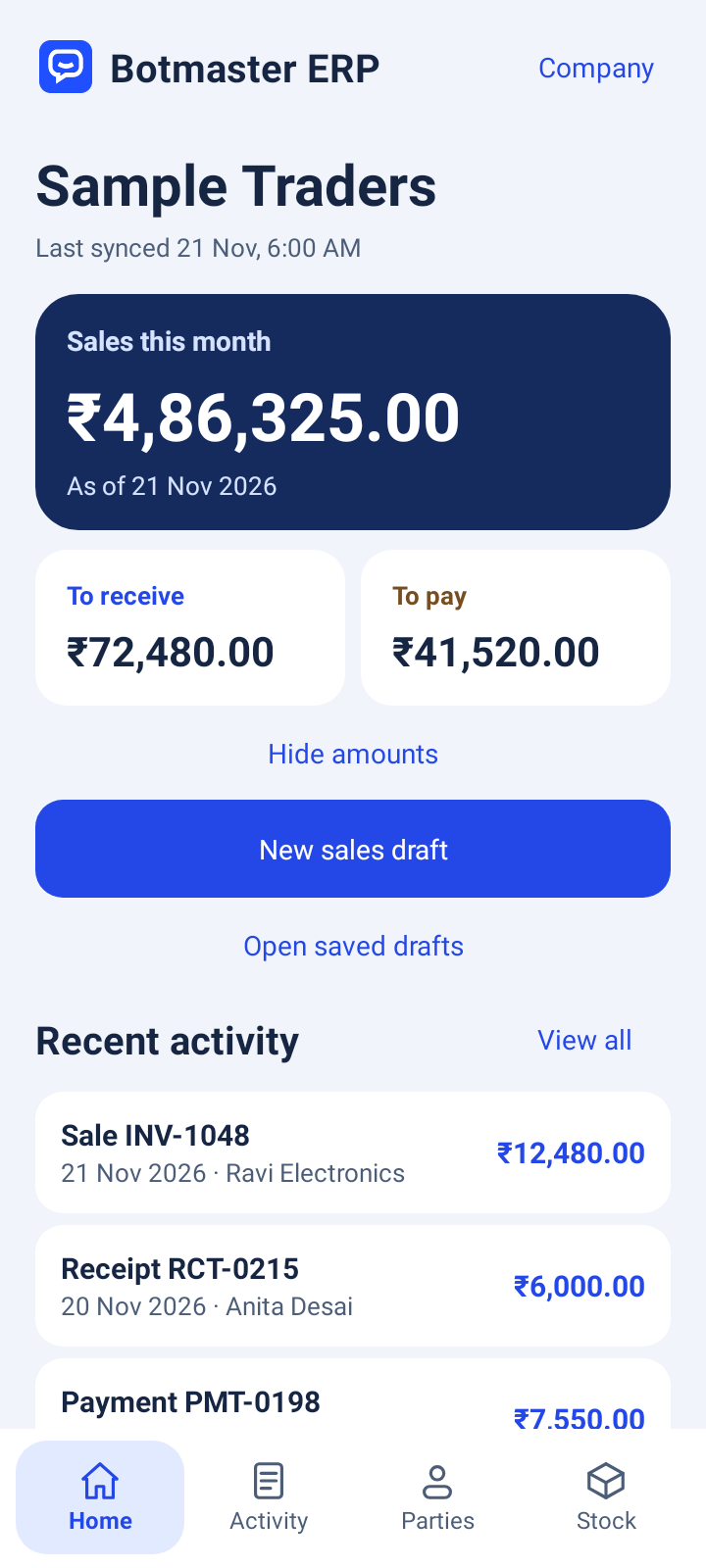
Android pilot showing sales this month, amounts to receive and pay, and recent activity.
Made for India

Built for ₹, lakhs and GST

Botmaster ERP speaks the way Indian businesses keep books — from the digit grouping to the financial year.

Invoiced this financial year
Rupees 6,48,755
9 sale invoices
Received against them
Rupees 2,83,800
Recorded bill by bill
Balance due
Rupees 3,42,834
6 open, 0 overdue
Sales this month
Rupees 1,40,611
Shown as 1.41L on the chart

Figures from the “Sample Traders” demo company used in the screenshots on this page.

  • Lakh and crore grouping

    Amounts read ₹6,48,755, not 648,755. Charts label axes in lakhs.

  • April–March financial year

    Registers default to the current financial year, 01-04 to 31-03.

  • GSTIN and state on every party

    Company and party records carry GSTIN, state and billing details.

Inside the app

Four screens that run your whole day

Each card is a real capture of the Botmaster ERP Windows app. Keep scrolling to move through the deck.

Sale

01 / 04

From quotation to payment

Create GST invoices, quotations, purchase orders and delivery challans. Follow up on unpaid invoices, record receipts against specific bills, and print or export documents as PDFs. Keep customer purchase orders and supporting bill photos with the transaction.

  • GST invoices, quotations and delivery challans
  • Follow up on unpaid invoices
  • Record receipts against specific bills
  • Print or export any document as a PDF
Sales invoice register showing invoice totals, amounts received, balances due and payment status.

Stock

02 / 04

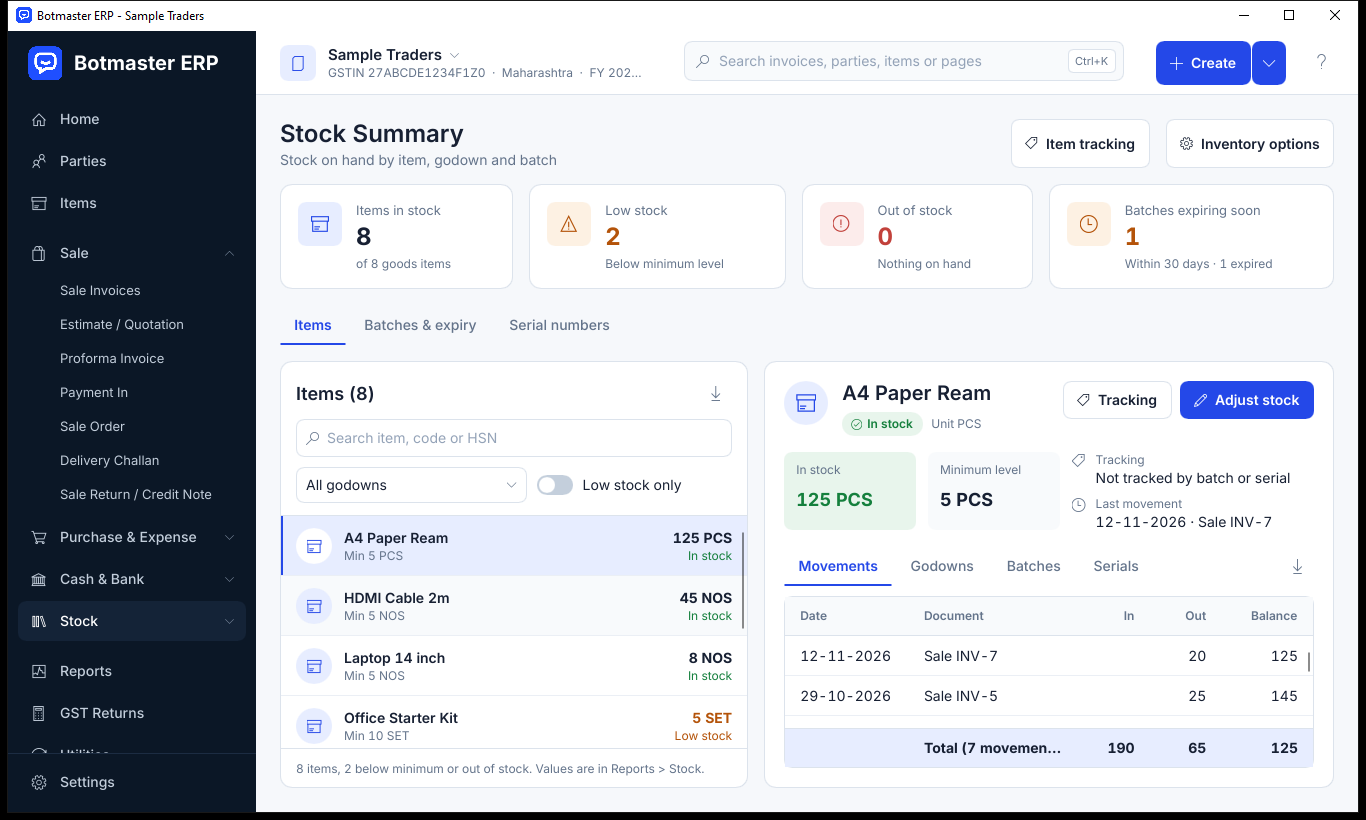
Know what is in stock

See current quantities and low-stock items. Maintain item categories and units, and track batches, serial numbers and stock across godowns where your business needs that level of detail.

  • Current quantities and low-stock items
  • Item categories and units
  • Batches, serial numbers and expiry
  • Stock held across godowns
Stock summary showing quantities, low-stock warnings and item movements.

Parties & collections

03 / 04

See what you owe and what is owed to you

View party balances and transaction histories, record cash and bank activity, and review outstanding invoices. Check your profit and loss, balance sheet, and receivables or payables ageing from the reporting area.

  • Party balances and transaction histories
  • Record cash and bank activity
  • Outstanding invoices at a glance
  • Profit & loss, balance sheet and ageing
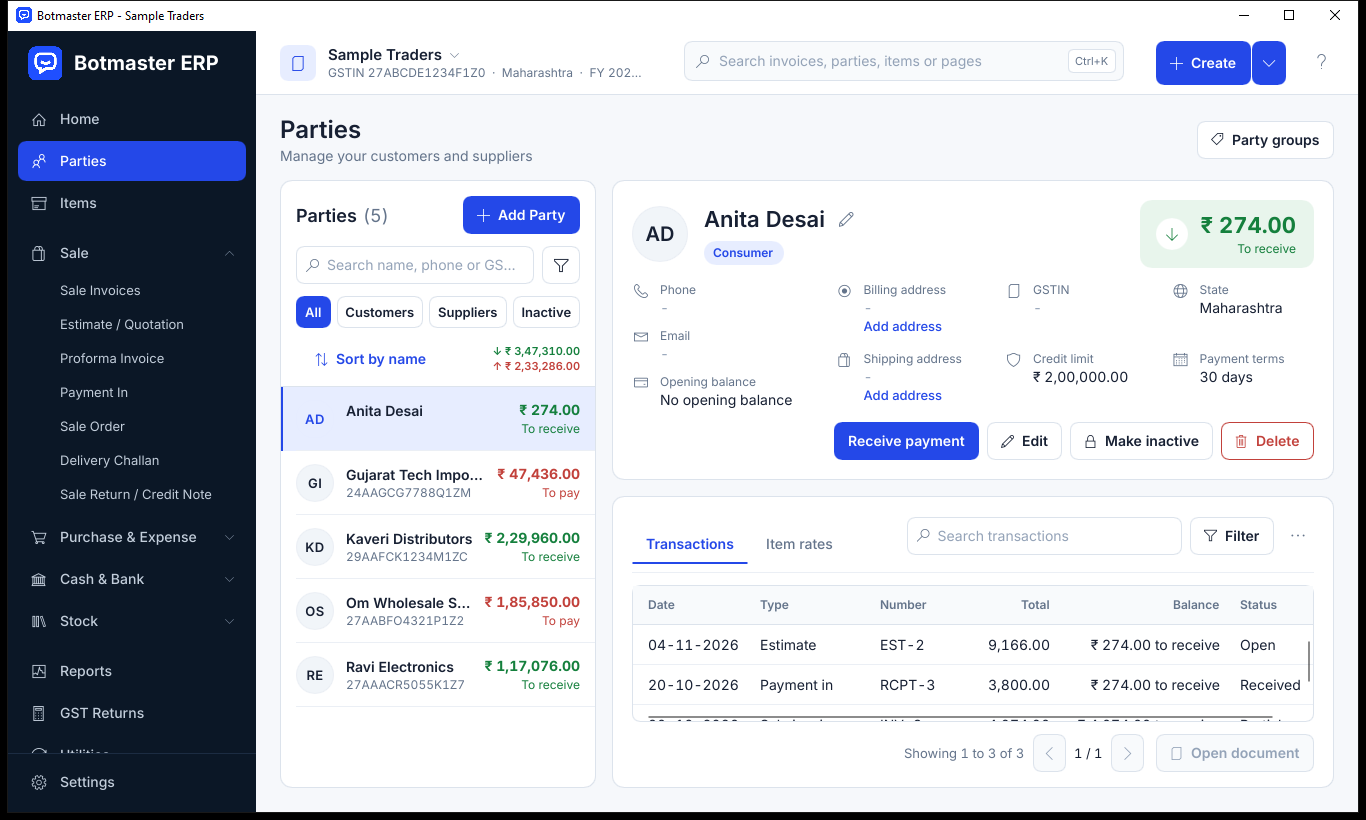
Party profile showing a sample customer balance and recent transactions.

GST & reporting

04 / 04

Get your GST records ready

Look up company or party details from a GSTIN when connected. Prepare GST reports and export e-invoice and e-way bill JSON. Companies with an authorized TaxPro connection can also submit eligible documents from Windows.

  • Look up company or party details from a GSTIN
  • Prepare GST reports
  • Export e-invoice and e-way bill JSON
  • Submit eligible documents through TaxPro

Reporting area

  • Profit & loss
  • Balance sheet
  • Receivables ageing
  • Payables ageing
  • GST reports
  • Stock report

Review any of these from the reporting area, then export or print the result.

Keep scrolling
The rest of the app

The parts you only need once a week

Purchase, cash and bank, GST returns, attachments and exports — all sitting on the same company file.

Purchase & expense

Record purchase bills and expenses against the right party, then carry them straight into your ledgers and stock.

Cash & bank

Record cash and bank activity, keep cash in hand and bank balances apart, and see both on the dashboard.

GST returns

Prepare GST reports from the data you already have, and export e-invoice and e-way bill JSON for eligible documents.

Attachments on the bill

Windows trade documents accept PDF, JPG and PNG attachments, so a purchase order or a bill photo stays with the transaction.

Take your data with you

Each company lives in its own file with backups you control, and supported records export to Excel and Tally XML.

Items & parties

Maintain item categories and units, and keep customer and supplier records with their GSTIN and billing details.

Android pilot

Take your business overview with you

Pair the Android pilot with a company in Botmaster ERP for Windows to see synced sales, recent activity, party balances and stock. When the company enables mobile posting, paired users can submit sales and cash receipts for processing by the Windows app.

  • Synced sales, recent activity, party balances and stock
  • Submit sales and cash receipts when the company enables it
  • Windows processes those submissions when the paired company is open
  • Pair using the code generated in Settings → Cloud sync
Request Android pilot accessAndroid 11 or later · opt-in pilot
Android pilot preview showing a sample company dashboard with sales this month, amounts to receive and to pay, and recent activity.
Android pilot preview
How it works

Work from your own company file

Botmaster ERP runs on your Windows PC. There is no hosted account to create and no monthly subscription to start on.

Step 01

Create a company file

Install Botmaster ERP on Windows, then create a company or open an existing Botmaster ERP company file. Every company is kept separately.

Step 02

Work offline

Core billing, accounting and inventory work offline on Windows. Invoices, payments, stock and reports do not need a connection.

Step 03

Back it up on your schedule

Your company file is a local file on your own PC, so you decide when and where the backup goes.

Internet access is needed for live GST services, TaxPro submissions and cloud sync to Android. Everything else works without it.

Download and onboarding

Install it, create a company, bill your first invoice

Two steps on Windows get you to a working company file.

Botmaster ERP for Windows

64-bit Windows 10 or later· Version 0.2.5 · 22 MB

Install Botmaster ERP, then create a company or open an existing Botmaster ERP company file.

The screenshots on this page come from a Windows tester-fix build with generated sample records, and may differ from the installer you distribute.

Botmaster ERP for Android

Android 11 or later

Android access runs through an opt-in pilot. Pair the app using the code generated in Settings → Cloud sync on Windows. A company administrator enables mobile sales and cash receipts separately.

The Android preview above shows an earlier pilot interface. The current workflow submits sales and cash receipts through a paired Windows company.

FAQ

Questions, answered plainly

What small business owners ask before they install it — no sales pitch attached.

Start on Windows

Install the app, create a company file, and add your parties, items and first invoice.

Download for Windows

Indian retailers, wholesalers, service businesses and small teams that need GST billing, stock and bookkeeping in one place.

Yes. You can create bills, record payments, manage stock and view reports offline on Windows. Online GST lookups, TaxPro submissions and Android cloud sync require an internet connection.

Yes. Choose a previous delivery address for the customer or type a new one. Each invoice records the destination chosen for that delivery.

Yes. Windows trade documents accept PDF, JPG and PNG attachments. You can open saved attachments again from the document.

Windows supports JSON export. Online generation requires an authorized TaxPro connection and eligible transactions.

View synced activity, sales totals, party balances and stock. If the company has enabled it, you can submit sales and cash receipts. Windows processes those submissions when the paired company is open.

The Windows app stores each company in a local company file and supports backups. It also offers Excel and Tally XML exports for supported records.

Botmaster ERP — faster, reliable, always on

Start managing your business with Botmaster ERP

Install the Windows app, create a company, and start with your parties, items and first invoice.

Windows 10 or later (64-bit) · Android 11 or later for the pilot